
一、日期类型
我们的 Student 类有一个成员变量 birthday
private Date birthday;//出生日期
在我们的 Studnet.hbm.xml 对应的是自动生成的 属性
<property name="birthday" type="java.util.Date">
<column name="BIRTHDAY" />
</property>
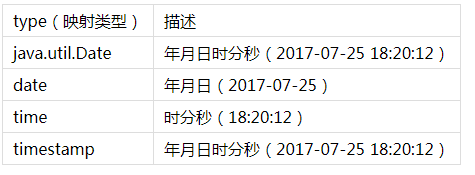
type 表示该字段的类型,不同的类型,会让数据表的字段类型也不同
二、对象类型
我们这里使用使用 Blob 类型存照片
1、Student 类中 成员变量如下
private int sid;//学号
private String name;//姓名
private int sex;//性别
private Date birthday;//出生日期
private String address;//地址
private Blob picture;//照片
2、然后删除原来的 Student.hbm.xml 文件,重新生成
3、在测试类添加 testWriteBlob方法
@Test
public void testWriteBlob() throws Exception {
Student s = new Student(1,"杜甫",1,new Date(),"四川");
//先获得照片文件
File f = new File("d:"+File.separator+"boy.jpg");
//获得照片文件的输入流
InputStream input = new FileInputStream(f);
//创建Blob对象
Blob image = Hibernate.getLobCreator(session).createBlob(input,input.available());
//设置照片属性
s.setPicture(image);
session.save(s);
}
注意:这里 Blob 是 java.sql.Blob 包下
4、然后使用 Junit Test 运行 testWriteBlob 方法
5、为了证明是否真的是写入数据库中,我们重新把照片读出来
在测试类中添加 testReadBlob 方法
@Test
public void testReadBlob() throws Exception {
Student s = (Student)session.get(Student.class, 1);
//获得Blob对象
Blob image = s.getPicture();
//获得照片的输入流
InputStream input = image.getBinaryStream();
//创建输出流
File f = new File("d:"+File.separator+"dest.jpg");
//获得输出流
OutputStream output = new FileOutputStream(f);
//创建缓冲区
byte[] buff = new byte[input.available()];
input.read(buff);
output.write(buff);
input.close();
output.close();
}
6、使用 Junit Test 运行 testReadBlob 方法
20171007155038568.png
三、组件属性
实体类中某个属性属于用户自定义的类的对象,下面我们通过一个例子来解释
1、实体类 Student.java 成员变量如下
private int sid;//学号
private String name;//姓名
private int sex;//性别
private Date birthday;//出生日期
//private String address;//地址
private Blob picture;//照片
private Address address; //地址
我们这里把之前的 String 类型的 address 改成 Address 类型
2、Address 类 部分代码如下
private String postcode;//邮编
private String phone;//手机
private String address;//地址
public Address(String postcode, String phone, String address) {
this.postcode = postcode;
this.phone = phone;
this.address = address;
}
3、修改 Student.hbm.xml
将之前的
<property name="address" type="java.lang.String">
<column name="ADDRESS" />
</property>
改成
<component name="address" class="Address">
<property name="postcode" column="POSTCODE"/>
<property name="phone" column="PHONE"/>
<property name="address" column="ADDRESS"/>
</component>
注意:单词不要打错
4、修改 测试类 testSaveStudent 代码
@Test
public void testSaveStudnets() {
//生成学生对象
Student s = new Student();
s.setName("陶渊明");
s.setSex(1);
s.setBirthday(new Date());
//s.setAddress("江西九江");
Address address = new Address("332000","13512345678","江西九江");
s.setAddress(address);
session.save(s);//保存对象进入数据库
}
5、修改 hibernate.cfg.xml 里的创建表的策略
因为要修改表结构,暂且把 update 改成 create
6、用 Junit Test 运行 testSaveStudent 方法